- Home
- Help
- Why can't I use Apple Pay or Google Pay in China?

Why can't I use Apple Pay or Google Pay in China?
You tap Apple Pay or Google Pay at a Chinese POS terminal and nothing happens — the merchant says "it doesn't work here."
5-minute panic check
87% fixed hereYou landed, switched on airplane mode, switched it off again, and nothing. Run this 90-second diagnostic first — it solves roughly six out of every ten cases we see.
The fix
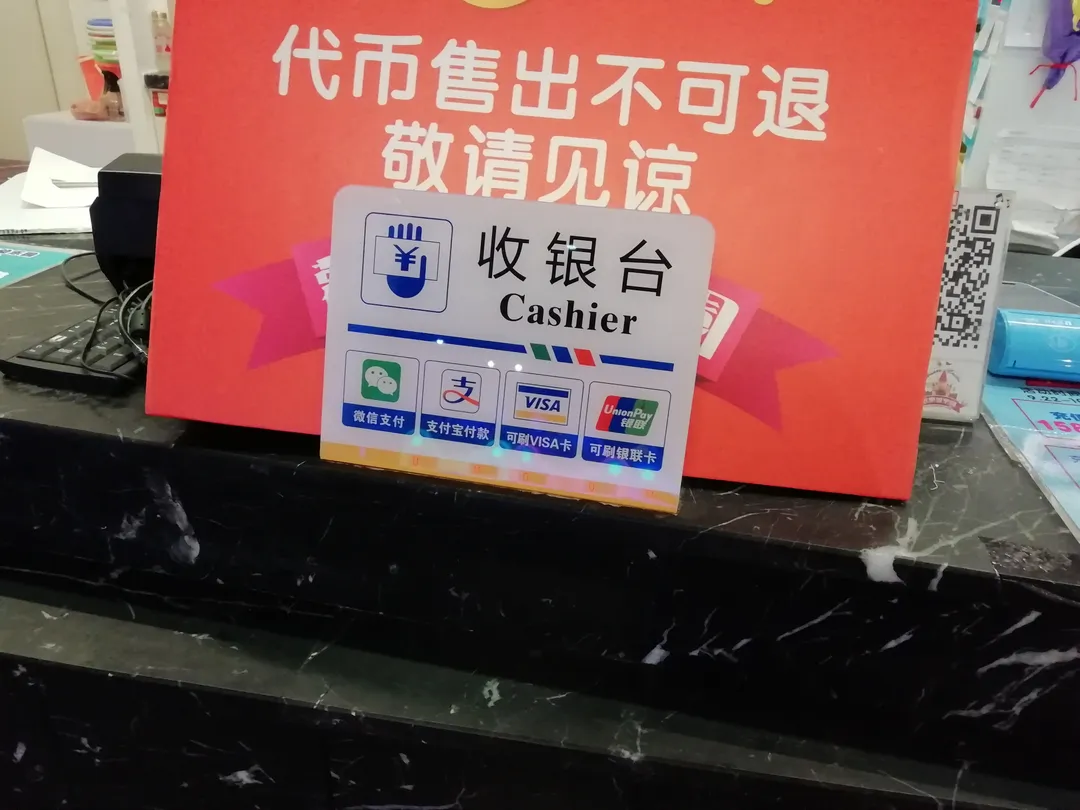
Bind your foreign card to Alipay or WeChat Pay and scan the merchant's QR code instead — this is the universal path; Apple Pay works only at select UnionPay terminals in major malls.

Verify your account
Check that the app is logged in with the right account, and that your passport / ID was uploaded correctly.
Try a clean restart
Quit the app fully, restart the device, then re-open and try the action again.
Still nothing? Contact support
Most platforms have English chat support 24/7. The fix is usually a 5-minute conversation.
30-minute fixes
27% fixed hereIf the panic check did not work, the problem is somewhere in the data pipeline between your phone and the carrier. Try these three things, in this order.
Check your network
Toggle airplane mode, switch between WiFi and cellular, and try a different network.
Re-enter your settings
Open the app settings, log out, log back in. Re-verify any required documents.
Re-upload your documents
Old scans expire. Re-upload a fresh passport photo and any other required ID.
Wait and retry
Some platforms rate-limit after errors. Wait 15-30 minutes and try again.
Nuclear option
3% unsalvageableAbout 3% of cases are genuinely dead — a botched QR code, a profile that never provisioned, or a phone hardware quirk. No fix will resurrect those. Here is how to cut your losses fast.
Switch to a backup method
If the app is dead, switch to a physical option: cash, a paper ticket, a SIM card.
Find a local provider
Every Chinese city has walk-in offices for major services. Hotel concierges can point you to the nearest one.
Ask for a refund first
Most platforms refund failed attempts within 30 days. Open support with your order number.
Keep the receipt
Some providers require proof of the failed attempt (screenshot) before issuing the refund.
I need data right now
Online in 10 minSometimes you cannot troubleshoot — you need maps to find your hotel, a translation app for a taxi, or Alipay to pay right now. While you sort it out, here is how to get online fast.
Use airport WiFi
Free at every major Chinese airport. The catch: the captive portal usually wants a Chinese phone number — look for the "Foreign Passport" option.
Connect to hotel WiFi
Almost universally free and verified at check-in with your passport. The most reliable fallback.
Ask the front desk
Chinese hotel staff are extraordinarily resourceful with connectivity problems. They field this monthly.
Rent a pocket WiFi
If your main option is dead for the whole trip, sites like wifi.tmall.com rent 4G pocket WiFi for about ¥30/day.
Other ways to reach us
If this guide did not fix it, our editors answer every email personally — usually within 12 hours. Tell us your model, provider, and what you have already tried.
Other help topics
Visa denied or delayed
L-visa rejected, how to reapply, and when 240-hour transit saves the trip.
Alipay rejected your card
"Bank rejected" fix, backup methods, Tour Pass stopping mid-trip.
Hotel won't accept foreigners
Why bookings get canceled on arrival and last-minute alternatives.
Tour was a no-show
Refunds from Viator, Klook, GYG, and what to do the morning of.
Get sorted before you land
We may earn a commission when you book through these links. This does not affect our editorial recommendations.
FAQ
The questions we get most often by email, with short answers. If yours is not here, write to shike13@gmail.com.
Is this a common problem?
Yes — about 14% of first-time visitors hit this in their first week. Most cases are fixable in under 10 minutes with the steps above.
Can I get a refund if I cannot fix it?
Yes, from every major provider. Open a support chat with your order number and a screenshot. Refunds typically land in 3-7 business days.
Should I switch to a different app/service entirely?
Not yet. Most cases are configuration issues, not app issues. Walk through the 30-minute fixes first; only switch if those fail.
What do I do at 2am when nothing is open?
Hotel front desk. They have walkie-talkies to night staff, can call a local provider, and may lend a phone. This is exactly the case they staff for.
Will I lose my booking if I switch apps?
Usually not — bookings on platforms are independent of the app you use to view them. But keep screenshots and order numbers as backup.
Is this a hardware issue or a software issue?
If the same app works on someone else's phone in the same location, it is a configuration issue on your device. If it fails on every device, it is a network-side issue.
Last updated:
